DAX – TOTALYTD Function
Understand Year to Date(TOTALYTD) Dax function working in Power BI. Read More

Understand Year to Date(TOTALYTD) Dax function working in Power BI. Read More

Understand Quarter to Date(TOTALQTD) DAX function working in Power Bi. Read More

Understand Total Month to Date (TOTALMTD) DAX function in Power Bi. Read More

How to use PREVIOUSYEAR DAX function in Power BI. Time Intelligence DAX function in Power BI. Read More

Returns a table that contains a column of all dates from the previous month, based on the first date in the dates column, Read More

Returns a table that contains a column of all dates representing the day that is previous to the first date in the dates Read More
IF DAX function is used to checks a condition, and returns one value when it’s TRUE, otherwise it returns a second value. Read More

Replaces existing text with new text in a text string. It’s comes under Text functions DAX category. Read More

How to Create a Date Table Using CALENDAR DAX in Power BI? Power BI CALENDAR DAX Function Explained with Examples Read More
Understanding the SUMMARIZE() function In DAX. Summarize Function in Power BI Read More

In Power BI, how to check table 1 column values are exist in table 2 or not? Read More

Personalize visuals allows to end users to change existing visuals with new visuals as per their need. Read More

Power BI DAX functions AVERAGE, AVERAGEA & AVERAGEX are returns the average (arithmetic mean) of all the numbers in a column Read More

Power BI DISTINCTCOUNT DAX function is used to counts the number of distinct values in a column. Read More

COUNTBLANK DAX function is used to counts the number of blank cells in a column. Read More

How To Use The COUNTROWS DAX Formula in Power BI? Statistical DAX Functions in Power BI. Read More

With Power BI Import Mode, you can change column name dynamically on visuals, to achieve this you have to follow below steps. Read More
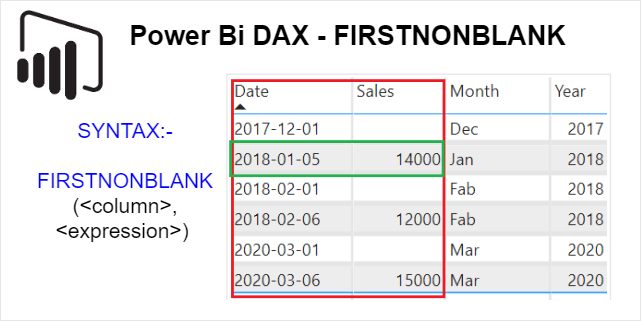
FIRSTNONBLANK DAX returns the first value in the column for which the expression has a non blank value. Read More