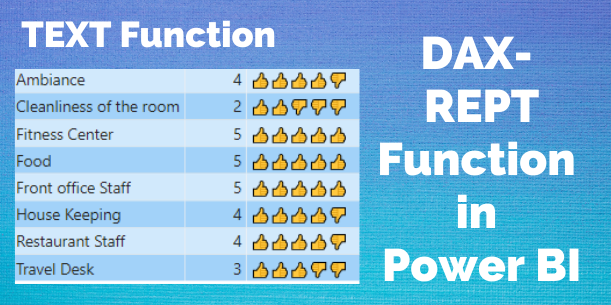
The REPT DAX function is used to repeat text a given number of times. It comes under DAX TEXT functions category.
Syntax
REPT(<text>, <num_times>)
Parameters
text – The text you want to repeat.
num_times – A positive number specifying the number of times to repeat text.
Let’s get started
Step-1: Create a measure with below DAX.
Rept = REPT("Hi", 4)
Step-2: Now drag one card visual into Power BI canvas to see the REPT result.

REPT DAX function another example-
Import the hotel feedback ratings dataset provided below into Power BI Desktop:
| Category | Ratings |
| Front office Staff | 5 |
| Ambiance | 4 |
| Restaurant Staff | 4 |
| Travel Desk | 3 |
| House Keeping | 4 |
| Food | 5 |
| Fitness Center | 5 |
| Cleanliness of the room | 2 |
Now follow these steps-
Step-1: Add a new column (Right-click on the dataset > select New column) and input the following DAX code:
Ratings with emoji =
REPT( UNICHAR ( 128077 ), feedback[Ratings])
& REPT ( UNICHAR ( 128078 ), 5 – feedback[Ratings] )
Step-2: Here, Unicode number 128077 represents the thumbs-up sign, and 128078 represents the thumbs-down sign. For a broader array of Unicode characters, you can visit the following website: https://unicode-table.com/en/emoji/.
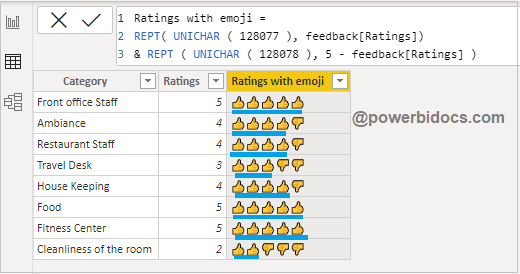
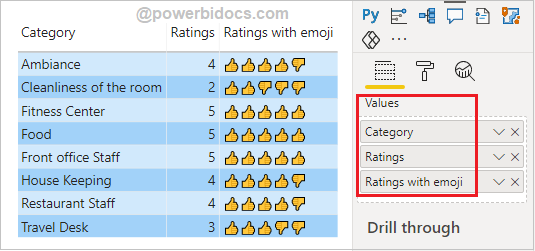
Step-3: See the final result.
Note
- If number_times is 0 (zero), REPT returns a blank.
- If number_times is not an integer, it is truncated.
- The REPT function result cannot be longer than 32,767 characters, or REPT returns an error.
Refer DAX post:- DAX Tutorials
Hope you enjoyed the post. Your valuable feedback, question, or comments about this post are always welcome or you can leave us message on our contact form , we will revert to you asap.
