
Power BI CONCATENATE DAX function is used to join two text strings into one text string. It comes under Text Filter DAX functions category.
Refer similar Dax function: CONCATENATEX DAX
Syntax :
CONCATENATE( <Text1>, <Text2> )
Description:
| S no. | Parameter | Description |
| 1 | Text1 | First text strings to be joined into a single text string. Text strings can be Number or Text |
| 2 | Text2 | Second text strings to be joined into a single text string. Text strings can be Number or Text |
Let’s start with an example:
Step 1: Sample Dataset as below:
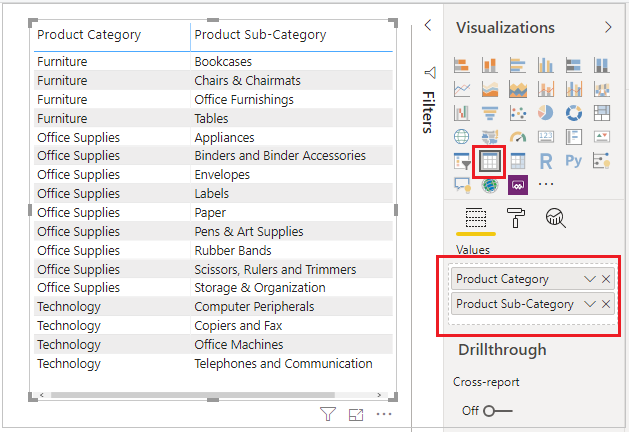
Step 2: Create a New column, right click on Dataset & click on New column.
Step 3: Write DAX for CONCATENATE two strings.
CONCATENATE_Result =

CONCATENATE(Orders[Product Category], Orders[Product Sub-Category])
Above DAX join two string without any space, if you want to add space or any special symbol between two string then write below DAX.
CONCATENATE_With_Space =
CONCATENATE(
CONCATENATE( Orders[Product Category], " " ),
Orders[Product Sub-Category]
)
Step 4: Now drag new columns to Table Visual & see the output

Refer similar Dax function: CONCATENATEX DAX
Hope you enjoyed the post. Your valuable feedback, question, or comments about this post are always welcome or you can leave us message on our contact form , we will revert to you asap.
Recommended DAX Post:
