
IF DAX function is used to checks a condition, and returns one value when it’s TRUE, otherwise it returns a second value. It comes under Logical DAX function category.
Syntax:
IF(<logical_test>, <value_if_true>[, <value_if_false>])
Description:
| S no. | Parameter | Description |
| 1 | logical_test | Any value or expression that can be evaluated to TRUE or FALSE. |
| 2 | value_if_true | The value that’s returned if the logical test is TRUE. |
| 3 | value_if_false | (Optional) The value that’s returned if the logical test is FALSE. If omitted, BLANK is returned. |
So, Let’s start with an example, you can download the sample Dataset from below link
Step-1: Create a measure and write IF condition as mentioned below.
IF Condition =
Var TotalSales = SUM(Orders[Sales])
Return
IF(TotalSales >= 100000, "Profit", "Loss")
Step-2 : Create another measure to implement a nested IF condition.
Nested_IF =
Var TotalSales= SUM(Orders[Sales])
Return
IF(TotalSales<50000, "Low",
IF(TotalSales>50000 && TotalSales< 100000, "Medium",
IF(TotalSales>100000, "High",
"Other"
)
)
)
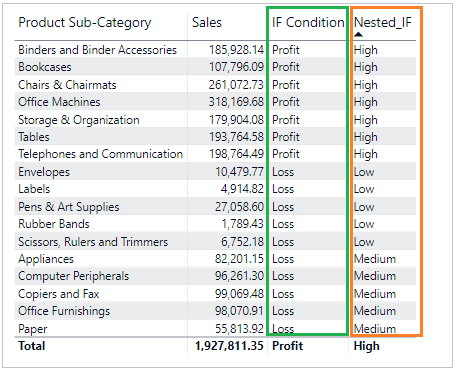
Step-3: Drag both measures onto the table visual. And you can see the output.
Hope you enjoyed the post. Your valuable feedback, question, or comments about this post are always welcome or you can leave us message on our contact form , we will revert to you asap.
