
EXCEPT DAX function is used to returns the rows of one table which do not present in another table. It comes under Table Manipulation DAX Functions category.
Syntax:
EXCEPT(<table_expression1>, <table_expression2>
Refer similar DAX Post – INTERSECT, UNION
Description:
| S no. | Parameter | Description |
| 1 | Table_expression | Any DAX expression that returns a table. |
Note:
- The two tables must have the same number of columns.
- Columns are compared based on positioning.
- This function is not supported for use in Direct Query mode.
Let’s utilize these two tables for practical purposes.
Table-1
| ID | Product | Price |
| 1 | Bike | 50000 |
| 2 | Car | 400000 |
| 3 | Cycle | 15000 |
| 4 | Bus | 2500000 |
| 5 | Truck | 3500000 |
Table-2
| ID | Product | Price |
| 1 | Bike | 50000 |
| 2 | Car | 400000 |
| 5 | Truck | 3500000 |
| 6 | AC | 500000 |
| 7 | Fan | 5000 |
Follow these steps-
Step-1: Create a new table- Go to Modeling tab and click on table icon.
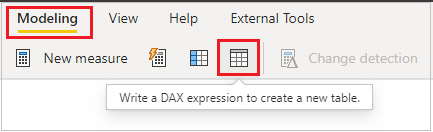
Step-2: DAX formula screen appears, write DAX formula here and press enter key.
Except = EXCEPT('Table-1', 'Table-2')

Step-3: You can see the new created table under fields, and it will return the rows of Table-1 which do not appear in Table-2.

Now change the Table sequence under EXCEPT DAX function-
Except DAX = EXCEPT('Table-2', 'Table-1')

See the output, it will return the rows of Table-2 which do not appear in Table-1.

Refer similar DAX Post – INTERSECT, UNION
Hope you enjoyed the post. Your valuable feedback, question, or comments about this post are always welcome or you can leave us message on our contact form , we will revert to you asap.

Is it necessary that both tables must have same number of columns?
Yes, it is mandatory.