DAX RelatedTable function is use to evaluates a table expression in a context modified by the given filters. It comes under Relationship functions category.
Syntax:
RELATEDTABLE(<tableName>)
Description:
tableName – The name of an existing table using standard DAX syntax. It cannot be an expression.
For RelatedTable function relationship between two tables should be:
- One-to-One Relationship
- Many-to-One Relationship, new column or measure can only be defined on the many side of the relationship
Two tables sample Dataset as below-
Orders Table
| OrderId | Product | Qty |
| 1 | Bike | 2 |
| 2 | Cycle | 1 |
| 3 | Cooler | 4 |
| 4 | Cycle | 3 |
| 5 | Bike | 2 |
| 6 | AC | 5 |
| 7 | Cooler | 1 |
| 8 | Cycle | 2 |
| 9 | Cycle | 5 |
| 10 | Bike | 3 |
Product Table
| Product |
| Bike |
| AC |
| Cooler |
| Cycle |
Understand the Requirement-
Do the sum of products quantity from orders table and add one column in Product table and display the quantity over there.
Let’s get started-
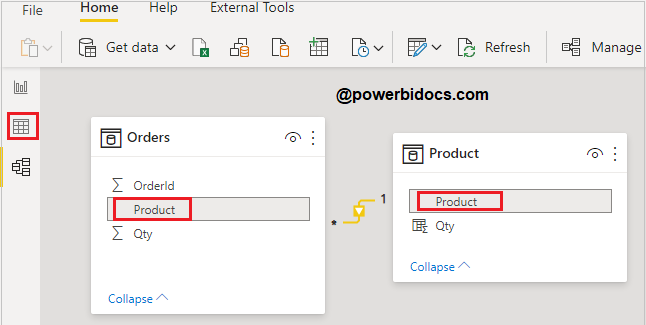
Step-1: Relationship should be important for this, let’s create a relationship between both tables.
Click on data tab > and make relationship based on Product column in both tables.
Step-2: Now create a new column in Product table. Right click on Product table and click on New column.

Step-3: Now write below Dax.
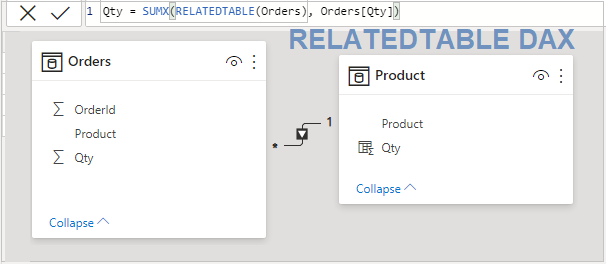
Qty = SUMX(RELATEDTABLE(Orders), Orders[Qty])
As you can see here we created a column inside Product table and RelatedTable returns a Orders table value here.
Step-4: See the final output-

Refer DAX post:- DAX Tutorials
Hope you enjoyed the post. Your valuable feedback, question, or comments about this post are always welcome or you can leave us message on our contact form , we will revert to you asap.
