Checks whether one of the arguments is TRUE to return TRUE. The function returns FALSE if both arguments are FALSE. It comes under Logical DAX functions category.
Syntax:
OR(logical1, logical2)
Parameters
logical1, logical2 – The logical values you want to test.
Download the sample Dataset from below link-
Let’s comprehend this with an example:
Take a look at the provided sample data below. Within this dataset, we have categories, subcategories, and corresponding sales data.

Now create a measure for OR Dax function
SUM with OR =
CALCULATE(
SUM('Global-Superstore'[Sales]),
FILTER ('Global-Superstore',
OR (
'Global-Superstore'[Category] = "Furniture",
'Global-Superstore'[Sub-Category]="Art"
)
)
)
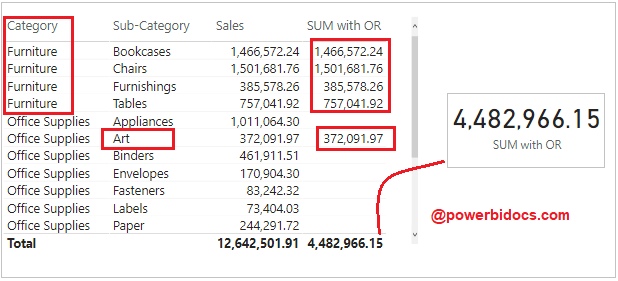
Now drag measure to Table and in Card visual, It will return SUM of sales whether one condition true.
Another way to write OR function-
Instead of OR you can use || sign, let’s examine the following DAX code to illustrate this point.
SUM with Or= CALCULATE(
SUM('Global-Superstore'[Sales]),
FILTER (
'Global-Superstore',
'Global-Superstore'[Category] = "Furniture" ||
'Global-Superstore'[Sub-Category]="Art"
) )
Refer more DAX functions: DAX functions
Hope you enjoyed the post. Your valuable feedback, question, or comments about this post are always welcome or you can leave us message on our Contact form , we will revert to you asap.
