
Microsoft Power BI updated the “Quick Measure Suggestions” feature in October 2022. This feature is currently in an experimental preview phase, allowing users to test its functionality and provide feedback.
Quick measure suggestions assist users in creating DAX measures using natural language, eliminating the need to rely solely on templates or write DAX expressions from scratch.
Enable this feature
File > Options & Settings > Option > Preview Features > Turn on Quick measure suggestions. After this restart the Power BI file.

Note:- Currently, this feature is only deployed to US datacenters (East US and West US). If your data is outside the US, the feature will be disabled by default unless your tenant admin enables.
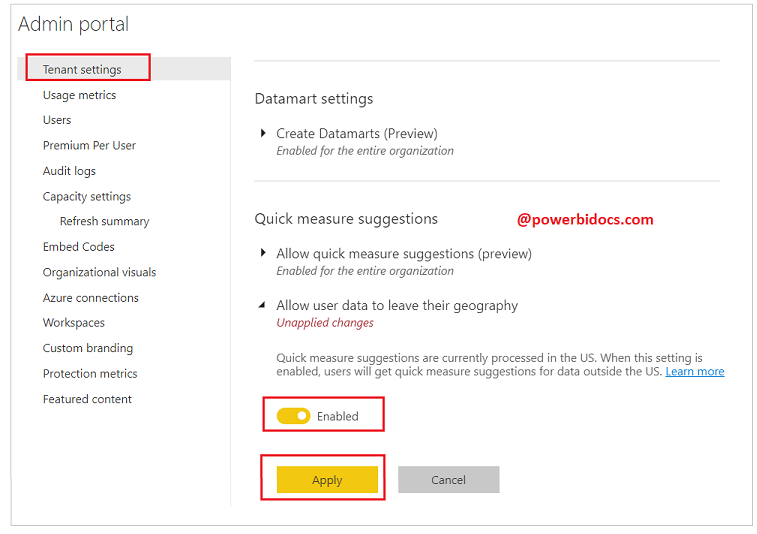
Let’s get started-
Now go to the Home ribbon tab and click on Quick measure > Suggestions–

In this suggestions window you can describe the measure which you want to create and click on Generate button, see the example below-

And if you want to add this measure in your file, click on Add button.
Example 2-
How to get Average sales of each product?
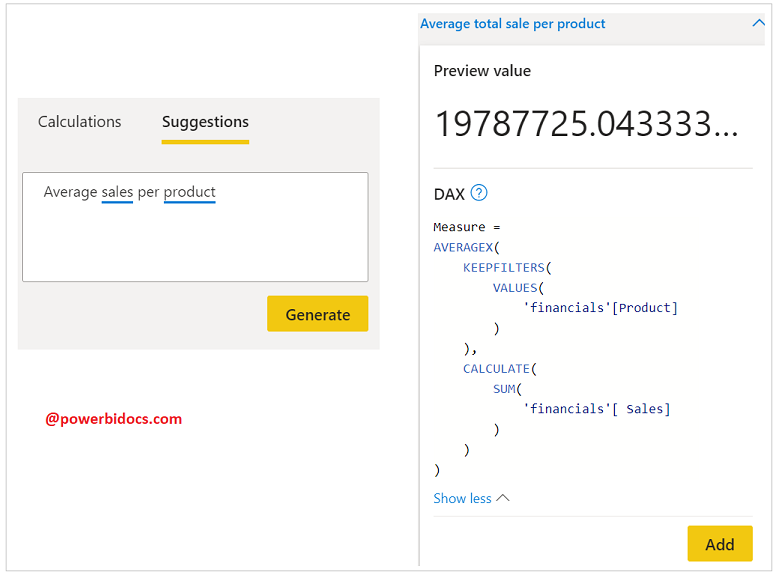
Refer DAX post:- DAX Tutorials
Hope you enjoyed the post. Your valuable feedback, question, or comments about this post are always welcome or you can leave us message on our contact form , we will revert to you asap.
