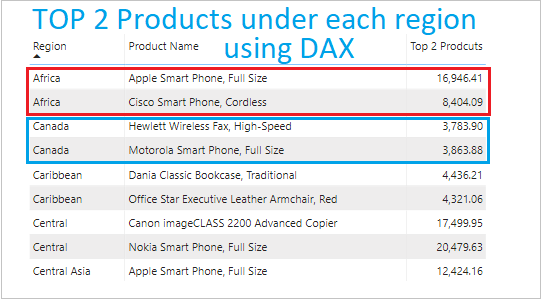
In this post I will show you how you can find TOP 2 products under each region sales wise in Power BI using DAX function.
Refer similar post: TOP N Filter
Let’s get started-
Download the sample Dataset from below link-
Follow these steps in order to get TOP 2 products under each region-
Step-1: Drag three columns into Table visual – Region, Product name & Sales.

Step-2: Create a measure for Total Sale.
Total Sales = SUM('Global-Superstore'[Sales])
Step-3: Create another measure to get TOP 2 Products
Top 2 Prodcuts =
Var GetProducts = VALUES('Global-Superstore'[Product Name])
Return
CALCULATE([Total Sales],
TOPN(2, ALL('Global-Superstore'[Product Name]), [Total Sales]), GetProducts)
VALUES: It returns one column table with distinct values from specified column.
ALL: Returns all the rows in a table, or all the values in a column, read in details…
TOPN: Returns the top N rows of the specified table.
Step-4: Now, drag the measure column into the Table visual, replacing the Sales column.

In above screen shot you can see the final result, it is showing TOP 2 selling products under each region.
Other DAX functions: DAX functions
Hope you enjoyed the post. Your valuable feedback, question, or comments about this post are always welcome.

Me sirvió perfecto, en mi caso solo necesitaba el top1. Muchas gracias!
Gracias!