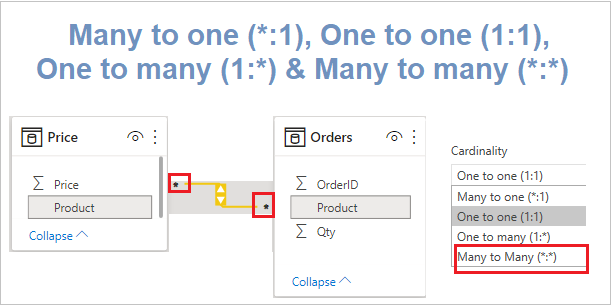
The cardinality of the relationship means having unique or multiple instances per value for the joining field between two tables.
Cardinality defined by the relationship and it refers to the relationship between two tables.
Types of Cardinality are- Many to one (*:1), One to one (1:1), One to many (1:*) & Many to many (*:*)
Understand Cardinality of Relationship in Power BI-
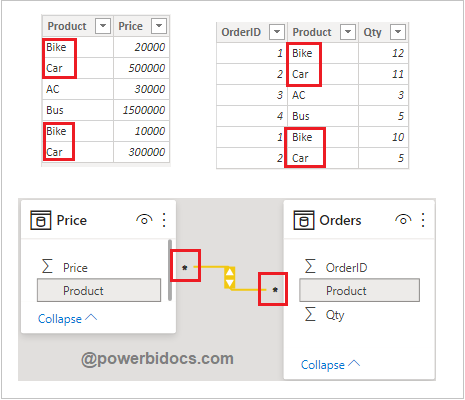
Consider following two tables-

Many to one (*:1): A many-to-one relationship means, the column in a given table can have more than one instance of a value, and the other related table has only one instance of a value.
* : Table contains more than one instance of a value.
1: Table contains only one instance of a value

Now open relationship in edit mode, double click on relationship line and you can see the cardinality.

One to many (1:*): In a one-to-many relationship, the column in one table has only one instance of a particular value, and the other related table can have more than one instance of a value.

One-to-one (1:1): In a one-to-one relationship, the column in one table has only one instance of a particular value, and the other related table has only one instance of a particular value.
1: Both table contains only one instance of a value

Many to many (*:*): With composite models, you can establish a many-to-many relationship between tables, which removes requirements for unique values in tables.
Composite model: Allows two or more data connections, including DirectQuery connections or Import mode.
* : Both table contains more than one instance of a value.
Hope you enjoyed the post. Your valuable feedback, question, or comments about this post are always welcome or you can leave us message on our contact form , we will revert to you asap.

Pingback: A Guide to Using Model View in Power BI Desktop